
Option Flow Quick Start
The Option Flow tape - every options print from the U.S. exchanges, with side, type, flags and premium - plus the Stats view and the Index view.
Option Flow is a live tape of options trades from the U.S. options exchanges. Each row is one print, showing:
- the contract;
- where it filled between the bid and the ask;
- whether it was a sweep;
- its size and premium;
- any flags that make it stand out.
Use it to see where large money went today, then check the ticker against dealer levels on Dealer Edge and Pulse.
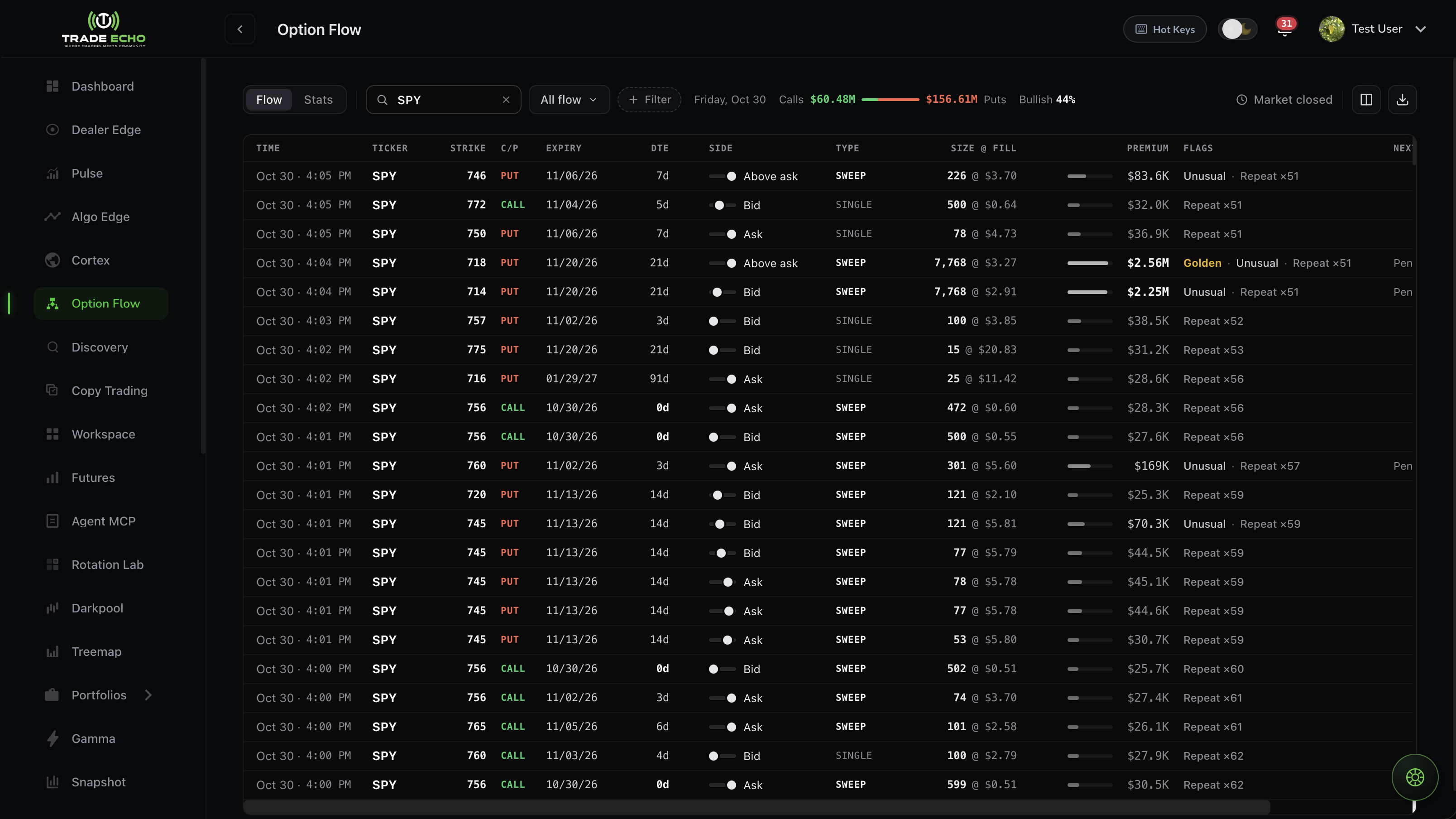 The Option Flow tape filtered to SPY, with side, type, size at fill, premium and flags
Open Option Flow#
- Sign in at app.tradeecho.com.
- Click Option Flow in the left sidebar (
/option-flow). - The Flow | Stats switch at the left of the toolbar moves between the tape and the Stats view. Keys F and S do the same.
Screen width: the page described here needs a window at least 700 px wide. On a phone browser or a narrow window you get the compact version of the page.
The toolbar#
| Control | What it does |
|---|---|
| Flow / Stats | Switch between the tape and Stats |
| Views | Built-in and saved views (below) |
| + Filter | Opens the filter drawer. Active filters show as chips you can remove. |
| Ticker search | Press / to jump to it |
| Live | Streams new prints. Turn it off to hold the tape still. |
| Columns | Choose, hide and reorder columns |
| Export CSV | Download the loaded prints |
A line in the toolbar shows calls against puts for what's loaded, with a Bullish %.
Built-in views#
Open Views to switch between:
- All flow
- Directional
- Sweeps
- Unusual (volume over OI)
- Repeat hits
- 0DTE
- $1M+
Save your own views and column layout. More on filters, views and columns.
The Index view (SPX, NDX, VIX, XSP, RUT) sits in the same menu, under Index options. See Index view.
Read a row#
The default columns are Time, Ticker, Strike, C/P, Expiry, DTE, Side, Type, Size @ fill, Premium, Flags and Next-day OI. In short:
- Side: where the print filled: Above ask, Ask, Mid, Bid or Below bid.
- Type: Sweep (filled across exchanges) or Single.
- Flags: Golden, Aggressive, Unusual and Repeat ×N.
- Unconfirmed or Late report: a print we leave out of totals.
Every column, flag and rule: Reading a print.
Go deeper on one ticker or contract#
- Ticker panel: click a ticker, or press T. It has Overview, Prints, Strikes and Expiries tabs, and buttons for Open in Pulse, Dealer Edge and an alert on that ticker.
- Contract drill-down: click a row, or press Enter.
- Row actions: hover a row for Alert, Pulse and Share.
Alerts from the tape#
Alert on a row (or A) turns on an alert for prints like that one. A toast confirms it ("Alert on for SPY", for example), names the alert tier, and offers Edit and Undo. Alerts arrive by push. If your Option Flow alerts are off, the toast offers Alert settings so you can turn them on.
Keyboard shortcuts#
| Key | Action |
|---|---|
| / | Search a ticker |
| J / K | Next / previous row |
| Enter | Open the contract drill-down |
| T | Open the ticker panel |
| A | Alert on prints like this |
| F / S | Flow / Stats |
Read flow with care#
A print shows a trade, not a reason. The same contract can be a new bet, a hedge, or one leg of a spread. Treat flow as one input:
- check the ticker against dealer levels on Dealer Edge;
- check price on Pulse;
- size every trade to your risk rules.
Related#
- Reading a print: columns, flags, the side rule and excluded prints
- Filters, views and columns
- Stats: the market and one ticker at a glance
- Index view: SPX, NDX and other index options
- Dark Pool
Trade Echo docs are for product education only - not financial advice. Options trading involves substantial risk and is not suitable for all investors.