
NewsEdge Quick Start
NewsEdge is Trade Echo's premium market intelligence tool. It delivers real-time news with a 20-second auto-refresh, so you see catalysts before they move the market. Filter by impact level, source, ticker, and watchlist to focus on what matters for your trades.
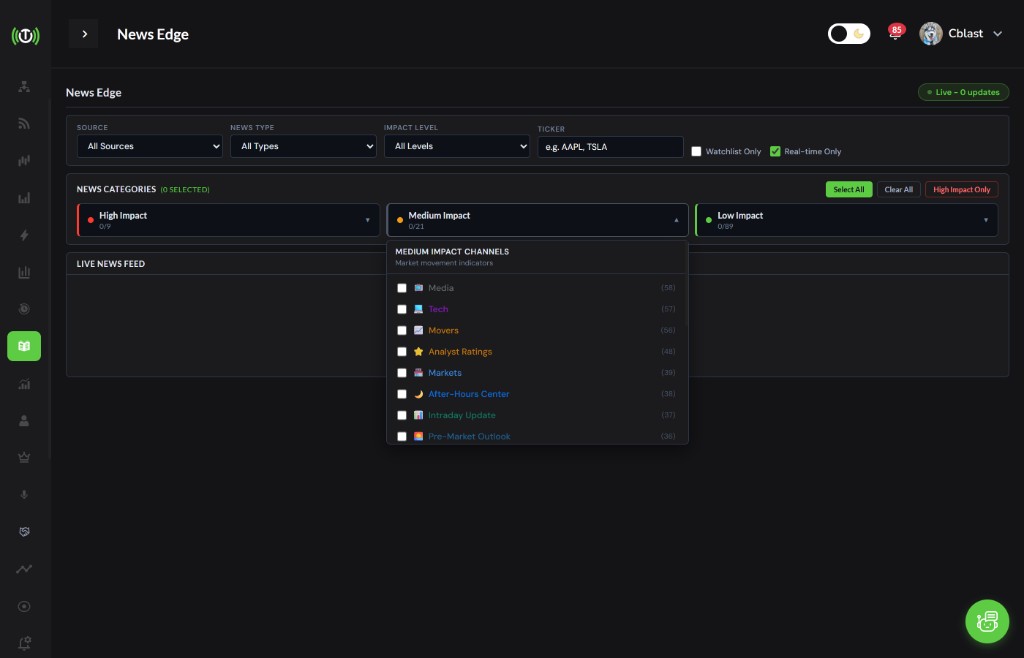 NewsEdge with impact levels and category filters
What is NewsEdge?#
What You Get#
- Real-Time News: Headlines as they break, not minutes later
- 20-Second Auto-Refresh: Stay ahead of the crowd
- Impact-Level Filtering: High, Medium, Low - trade the catalysts that move stocks
- News Type Presets: One-click filters for earnings, analyst activity, FDA, M&A, and more
- Watchlist Integration: Track news for your specific tickers
Why NewsEdge Matters#
News moves markets. Earnings beats, FDA approvals, analyst upgrades - these events cause 2-10% stock moves in minutes. NewsEdge surfaces them first so you can act before the move is over.
Impact Levels#
| Level | Examples | Typical Stock Move |
|---|---|---|
| High | Earnings, FDA, M&A, CEO changes, regulatory | 2-10% |
| Medium | Analyst upgrades/downgrades, guidance, partnerships | 1-5% |
| Low | Commentary, research, routine filings | Under 1% |
Filter by impact level to match your trading style. Day traders focus on High. Swing traders use High + Medium. Position traders may include Low for context.
News Type Presets#
Five presets let you target specific trading setups:
| Preset | Focus | Best For |
|---|---|---|
| Earnings Focus | Beats, misses, guidance | Earnings plays |
| Analyst Activity | Upgrades, downgrades, initiations | Analyst-driven moves |
| Corporate Actions | M&A, splits, dividends | Event arbitrage |
| Biotech Catalyst | FDA approvals, trial results | Biotech plays |
| Market Moving | High-impact news across all categories | Scalping, momentum |
Using Filters#
Source Filter#
Filter by source type - stock news vs. press releases.
Impact Level#
- High: Earnings, FDA, M&A, CEO, regulatory - expect 2-10% moves
- Medium: Analyst, guidance, partnerships - expect 1-5% moves
- Low: Commentary, research, routine - expect under 1% moves
Ticker Filter#
Enter a symbol to see only news for that stock. Useful for pre-market prep on your watchlist.
Watchlist Filter#
Show news only for tickers in your watchlist. Keeps your feed focused.
Real-Time Toggle#
Enable real-time mode for live updates. Disable to reduce noise when reviewing.
Quick Reference#
Daily Workflow#
- Pre-Market: Open NewsEdge, filter by High or Earnings Focus
- 9:30 AM: Enable real-time toggle, watch for first catalyst
- Throughout Day: Check Medium impact for analyst moves, partnerships
- Before Close: Review Low impact for next-day context
Decision Tree#
START → NewsEdge Alert
Impact Level?
├─ HIGH → Check ticker, chart, volume → Trade if setup fits
├─ MEDIUM → Assess relevance to your watchlist → Consider swing
└─ LOW → Skim for context or ignore
Top 5 Rules#
- Filter by impact - High for day trades, Medium for swings
- Act fast on High - 2-10% moves happen in minutes
- Confirm with chart - News + price action = higher conviction
- Use presets - Earnings Focus, Analyst Activity, Biotech Catalyst
- Watchlist first - News on your tickers = priority
Common Questions#
How often does NewsEdge refresh?
Every 20 seconds in real-time mode.
Can I filter by multiple impact levels?
Yes. Select High + Medium for a broader feed, or High only for day trading focus.
Does NewsEdge show pre-market news?
Yes. Real-time news includes pre-market and after-hours releases.
What if I miss a High-impact alert?
Check the chart. If the move hasn't started or is still early, you may still have entry. If it's already extended, wait for the next catalyst.
Next Steps#
- Impact Levels - Deep dive on High, Medium, Low
- Trading Catalysts - Five strategies using NewsEdge