
AlgoEdge Quick Start
Algo Edge in 10 minutes - 9 alert channels, a live table with side, type and flags, filters, the Stats view and share images.
Algo Edge sorts the day's notable options trades into 9 channels, each tuned for one kind of setup. Each row is one trade, showing:
- the contract;
- where it filled between the bid and the ask;
- what kind of trade it was (a single print, a sweep, a spread leg, a floor or cross trade);
- its size and premium;
- any flags that make it stand out.
Use it to spot high-momentum setups, especially 0DTE (zero days to expiration), then check the ticker against dealer levels on Dealer Edge and price on Pulse.
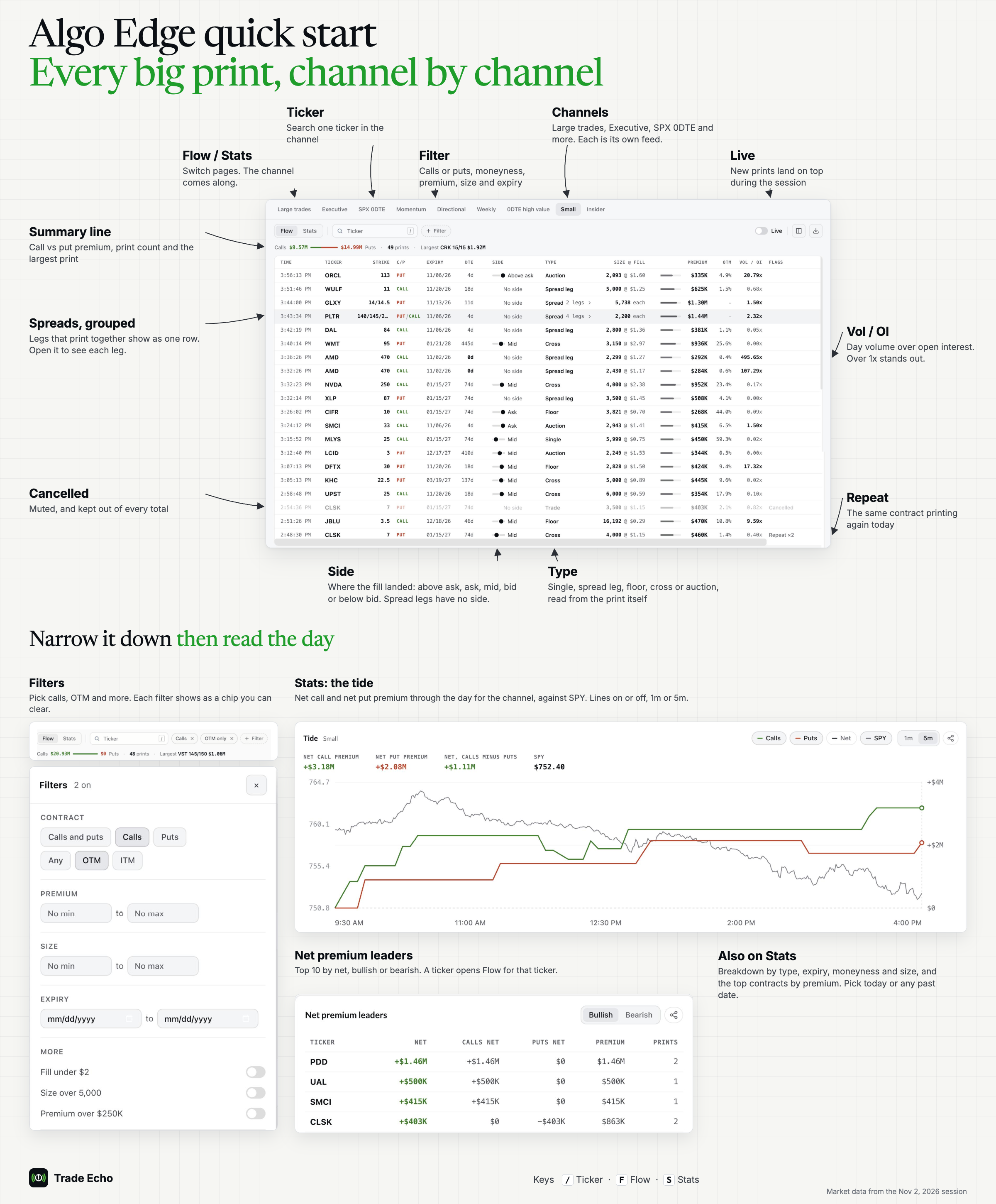 Algo Edge quick start: the channel tabs, Flow and Stats, the toolbar and the table on the Small channel, the Filters drawer, the tide and the net premium leaders
Open Algo Edge#
- Sign in at app.tradeecho.com.
- Click Algo Edge in the left sidebar (
/algo-edge). - Pick a channel from the row of tabs at the top.
- The Flow | Stats switch at the left of the toolbar moves between the table and the Stats view.
On a phone you get the compact version of the page, with the same channels.
The 9 Channels Explained#
| Channel | What It Shows | Best For |
|---|---|---|
| Large trades | Biggest options trades across all stocks | Major market movements, institutional activity |
| Executive | High-volume SPY and QQQ with short expirations | Index-based strategies, ETF trading |
| SPX 0DTE | Same-day expiry SPX trades only | Fast-paced day trading, high leverage |
| Momentum | High-volume, low-priced, near-term | Catching momentum early |
| Directional | Trades showing specific market direction | Following smart money |
| Weekly | Large trades expiring within a week | Short-term market bets |
| 0DTE high value | High-impact same-day across major indices | Intraday opportunities |
| Small | Smaller, high-volume outside major indices | Niche momentum opportunities |
| Insider | Aggressive far-OTM bets flagged by the insider-detection algorithm (adds an OTM % column) | Pre-catalyst research, unusual conviction on single names |
The toolbar#
| Control | What it does |
|---|---|
| Flow / Stats | Switch between the table and Stats |
| Ticker search | Show one ticker. Press / to jump to it. |
| F / S keys | Switch to Flow or Stats |
| + Filter | Opens the filter drawer. Active filters show as chips you can remove. |
| Live | New prints land on top during the session. Turn it off to hold the table still. |
| Columns | Choose, hide and reorder columns |
| Export CSV | Download the loaded trades |
A line under the toolbar shows calls against puts for what's loaded, the number of prints and the largest trade.
Filters#
+ Filter opens a drawer with:
- Contract: Calls and puts, Calls or Puts; Any, OTM or ITM.
- Premium and Size: a minimum and a maximum.
- Expiry: a date range.
- More: Fill under $2, Size over 5,000 and Premium over $250K.
Press Show prints to apply. Each active filter shows as a chip next to the ticker search; remove a chip to drop that filter, or press Reset in the drawer to clear them all.
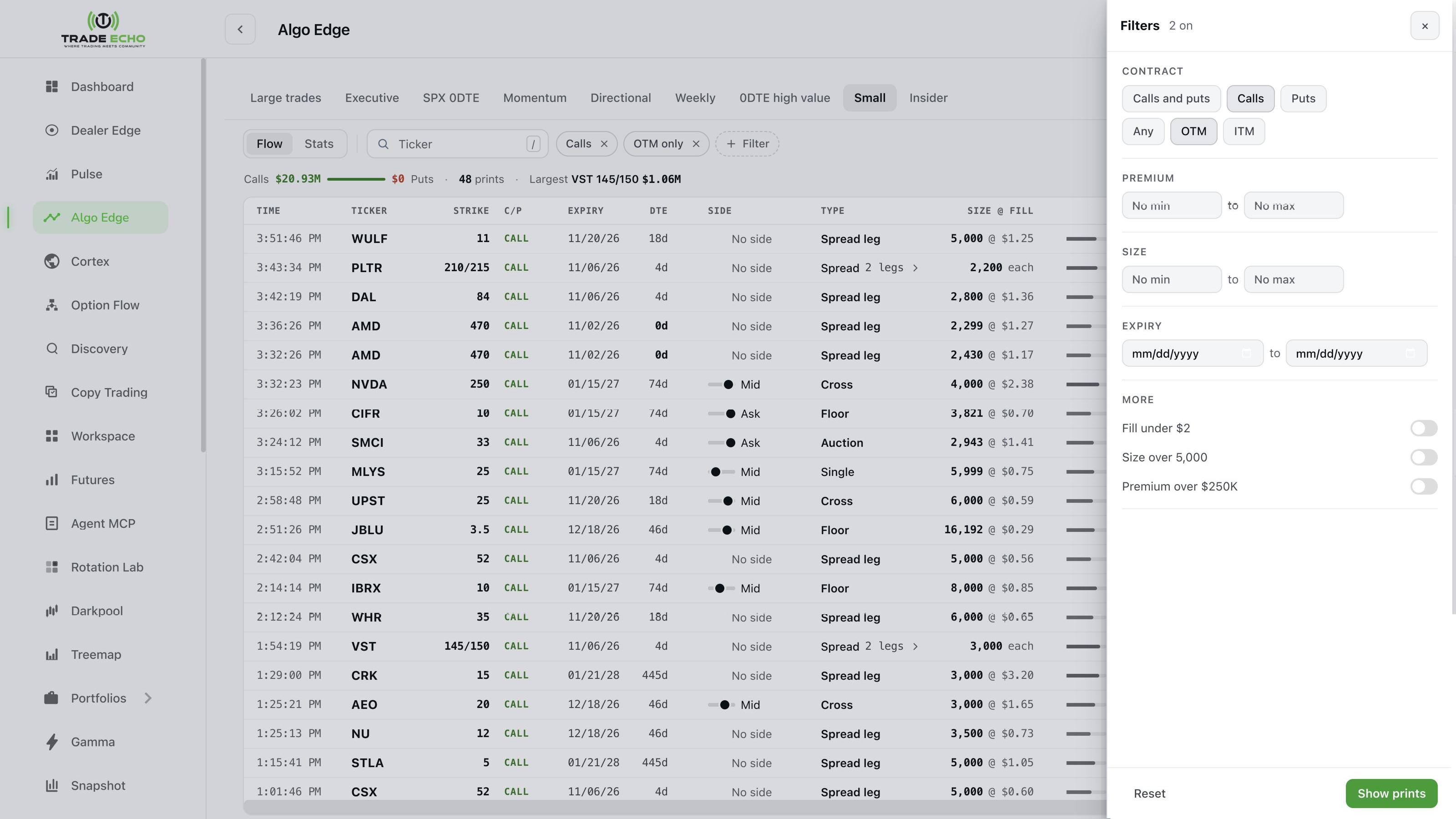 The Algo Edge filter drawer with Calls and OTM set, and their chips in the toolbar
Read a row#
The default columns are Time, Ticker, Strike, C/P, Expiry, DTE, Side, Type, Size @ fill, Premium, OTM, Vol / OI and Flags. In short:
- Side: where the trade filled against the best bid and offer just before it: Above ask, Ask, Mid, Bid or Below bid. Spread legs and some prints show No side.
- Type: Single, Sweep (filled across exchanges), Spread leg, Floor, Cross or Auction. Legs of one spread show as one Spread row with its leg count; click it to see each leg.
- Vol / OI: the day's volume over open interest. Over 1x stands out.
- Flags: Repeat ×N (the same contract printing again today, in what's loaded), Reported late, and Cancelled (shown muted, left out of every total).
Click a ticker to show only that ticker. Click a row to open the contract drill-down. Hover a row for Open in Pulse.
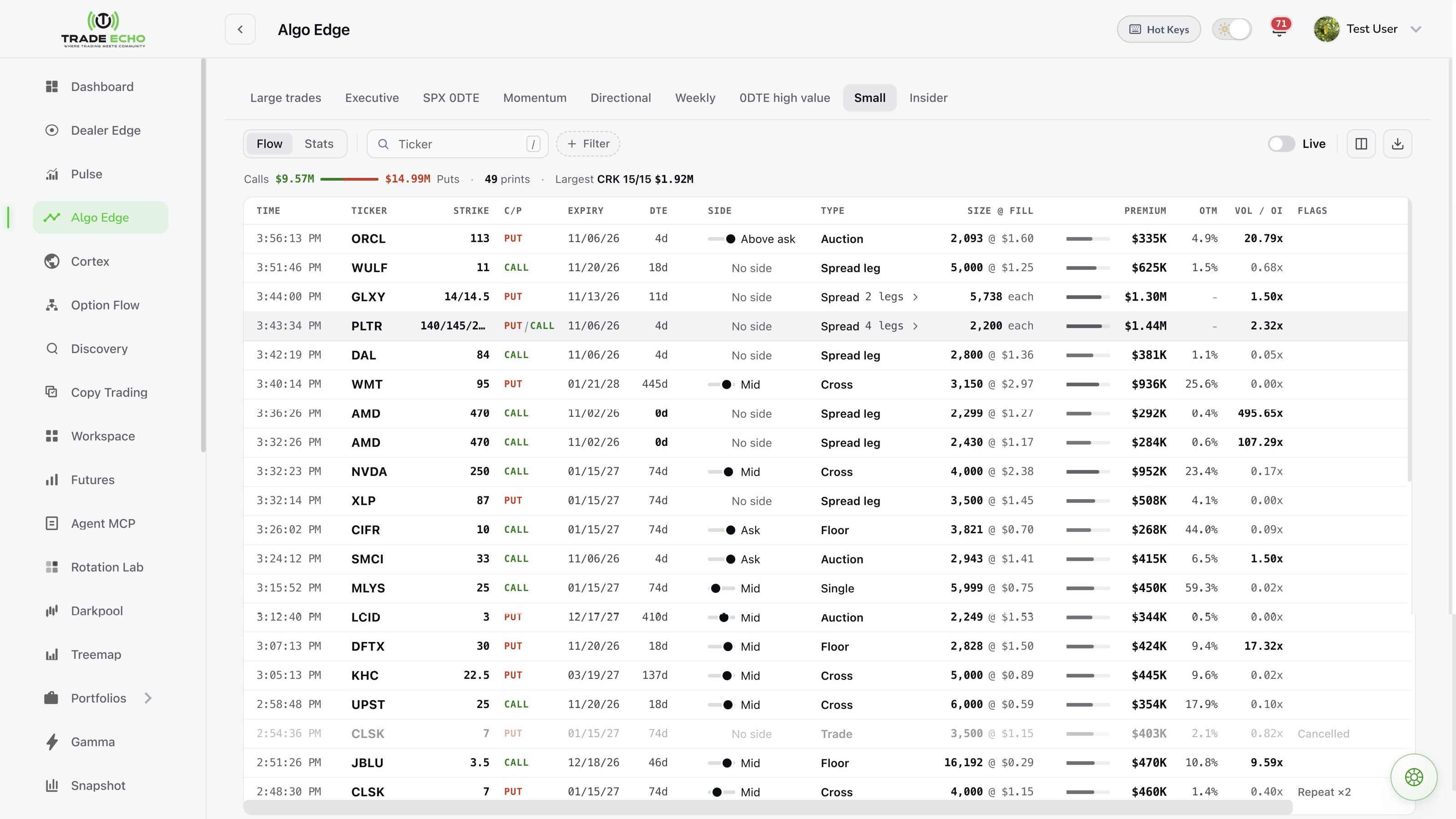 Algo Edge on the Small channel with no filters: side, type, a grouped spread row, size at fill, premium, Vol / OI and flags
The Stats view#
Stats sums the channel for the day:
- Tide: net call premium, net put premium and the net, over the session, with SPY's price (or the ticker's, when you search one). Switch between 1-minute and 5-minute steps.
- Net premium leaders: the top 10 tickers by net premium, Bullish or Bearish. Click a ticker to open Flow for it.
- Breakdown: premium by trade type, expiry, moneyness and size.
- Top contracts: the largest contracts by premium. A row opens the contract drill-down.
Stats shows today by default; pick any past session with the date button.
Net premium counts premium filled at or above the ask minus premium at or below the bid. Mid fills and spread legs have no side, so they add to neither.
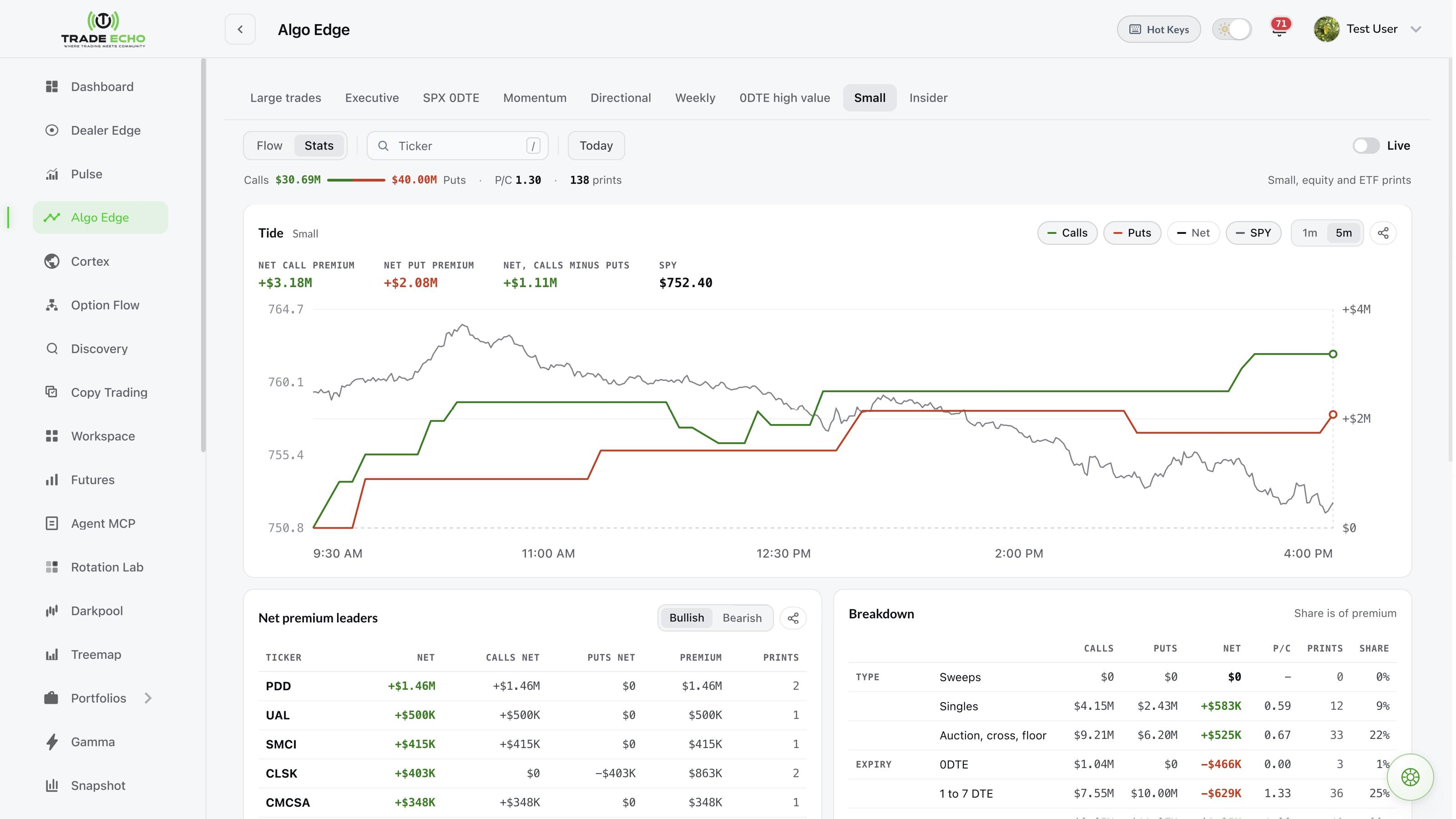 Algo Edge Stats on the Small channel: the summary line, the tide and the net premium leaders
Share an image#
The Share button on Tide and on Net premium leaders gives Copy image and Save image: a 16:9 card with the panel, the date and time in ET, and tradeecho.com, ready to post.
Finding the Best Trades#
What Makes a Good Alert?#
- Size: >1,000 contracts (shows institutional interest)
- Value: >$250K (significant capital at risk)
- Single-sided: Just calls OR just puts (not both). Spread legs show as Spread leg and have no side.
- Far OTM: 5%+ from current price (high leverage potential)
- Repeat signals: Same direction multiple times
What to Avoid#
- Paired trades (buying calls AND puts - hedging)
- Small size (under 100 contracts - retail noise)
- Near-the-money strikes (low leverage)
- Counter-trend moves (fighting the market)
SPX 0DTE Day Trading Strategy#
6-Step Checklist#
- Identify Large Trades - Size >1,000, Value >$250K, single-sided
- Check Market Context - SPX moved 1%+, clear trend, above-average volume
- Look for Far OTM Strikes - 5-10% from current, low premium $0.50-$3
- Wait for Repeat Signals - Multiple same-direction, 5+ minutes continuous flow, increasing size
- Execute Quickly - Within 5-10 min, 20% stop, 50-100% target
- Manage - Take 50% profit quickly, let runner ride, exit 1-2 hr before close
Example: Perfect SPX 0DTE Trade#
Alert: "SPX 5900 Calls @ 3.00 - Size: 1200x - Value: $360K - Time: 10:15 AM"
Your Action:
- Check: SPX at $5,875 (strike $5900 = +1.5% away)
- Context: SPX up 0.8% today, bullish momentum
- Enter: Buy 3 contracts at $3.00 = $900
- Target: $6.00 (100% gain) = $900 profit
- Stop: $2.40 (20% stop) = $180 max loss
- Exit: Close by 3:00 PM no matter what
NDX Morning Sniper Strategy#
Capture quick gains at market open:
- Monitor at 9:30 AM ET - Check Algo Edge as market opens
- Find OTM NDX Calls - Look for calls above NDX price with >$250K value
- Trade with trend - Only trade in the market's direction
- Act fast - Enter within 5-10 minutes as prices spike
- Lock profits - Exit at 50-100% gains quickly
NDX is extremely volatile - use smaller position sizes.
Risk Management Rules#
Golden Rules#
- Position Sizing: Only risk 1-2% of account per trade
- Stop-Losses: Always set a 20% stop below entry
- Time Decay: Exit 0DTE trades 1-2 hours before expiration
- Verify Signals: Don't trade blind - check price action
- Pattern Day Trader: Avoid if account under $25K
Position Sizing Example#
- Account: $10,000
- Max Risk: 2% = $200
- Option: $3.00, Stop: $2.40 (20%)
- Max Loss Per Contract: $0.60
- Contracts: $200 / $0.60 = 3 contracts max
Common Mistakes#
- No Stop Loss - Always set a stop-loss before entering
- Over-Sizing - Risk $200 max on $10K account, not $5,000
- Holding Into Close - Exit all 0DTE trades by 3:00 PM
- Trading Small Alerts - Only trade >1,000 contract alerts
PDT Protection#
If you have less than $25K:
- Limited to 3 day trades per 5 trading days
- 0DTE = day trading (enter and exit same day)
- Choose your 3 best setups per week only
- Consider swing trading instead
Using the Stats View#
Read Stats before you trade:
- Calls against puts in the summary line: a lopsided day tells you which side the channel leans.
- Tide: steady net call premium through the morning is a stronger read than one spike.
- Net premium leaders: where the channel's money is focused today. Switch to Bearish for the other side.
- Repeat ×N in the table: sustained interest in one contract is a higher-probability signal than a single print.
Quick Reference#
Daily Workflow#
- Open Algo Edge at market open
- Switch to SPX 0DTE channel
- Wait for >1,000 contract, >$250K alert
- Verify with market context
- Enter with 20% stop, 50-100% target
- Exit by 2 PM no matter what
- Review stats for tomorrow's plan
Decision Tree#
- Size >1,000? No - Ignore. Yes - Continue
- Value >$250K? No - Ignore. Yes - Continue
- Single-sided (calls OR puts)? No - Ignore. Yes - Continue
- Strike 5%+ from current? No - Ignore. Yes - Continue
- Market moving same direction? No - Ignore. Yes - Enter trade
Top 3 Rules#
- Size Matters - Only trade >1,000 contracts and >$250K value
- Verify Everything - Check price action, trend, and volume before entering
- Protect Your Capital - Always set stops, size positions, exit by 2 PM
Common Questions#
Q: Which channel is best?
A: SPX 0DTE for day trading. Large Trades for swing trading.
Q: How often should I trade?
A: Only take the A+ setups. 2-3 trades per week max.
Q: What if I miss the alert?
A: Don't chase. Wait for the next high-quality alert.
Q: Should I leave Live on?
A: Yes, during the session. Turn it off when you want to study the table without new rows arriving.
Q: Can I trade with under $25K?
A: Yes, but limited to 3 day trades per week (PDT rule).