
Option Flow Stats
The Stats side of Option Flow - market tide, net premium leaders, a breakdown by type, expiry and moneyness, and top contracts, for the whole market or one ticker.
Stats turns the day's options flow into a few panels: where premium went, which tickers led, and how it split by type, expiry and moneyness. Open it with the Flow | Stats switch on Option Flow, or press S (/option-flow-stats). Your ticker and date carry over when you switch.
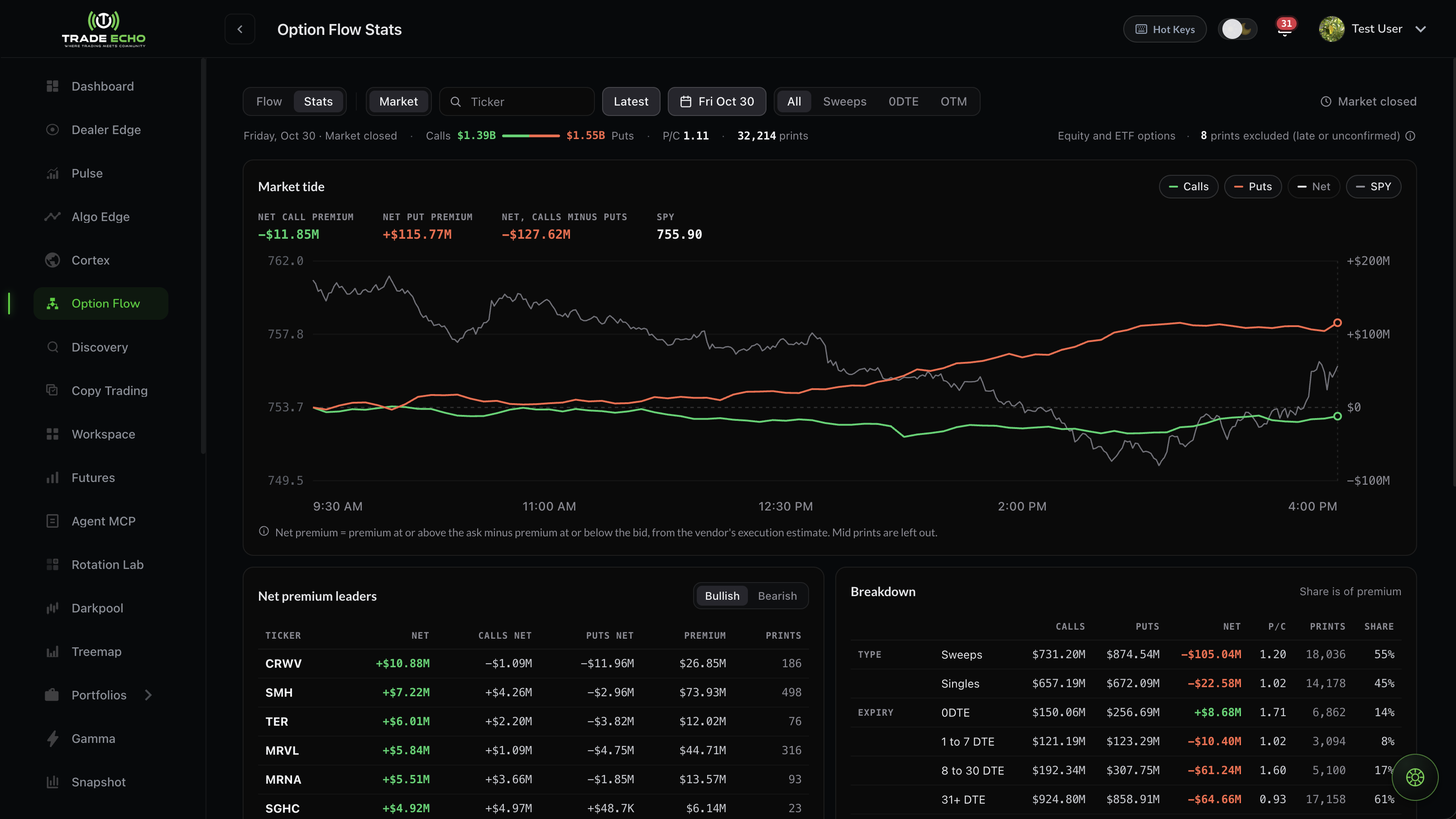 Option Flow Stats in market scope: the summary line, market tide, net premium leaders and the breakdown
The toolbar#
| Control | What it does |
|---|---|
| Market or a ticker | Look at the whole market, or search one ticker |
| Today (or Latest), Pick a date | Choose the session |
| All / Sweeps / 0DTE / OTM | Narrow every panel at once |
| Live | Updates every 30 seconds |
There's no week view. Pick a single session.
The summary line#
One line across the top shows:
- calls against puts, as a bar;
- the put/call ratio;
- the print count;
- the coverage, "Equity and ETF options";
- how many prints were excluded (late or unconfirmed). Hover the count to see why.
Market scope#
| Panel | What it shows |
|---|---|
| Market tide | Net call premium, net put premium and the net between them through the day, against SPY. Toggle Calls, Puts, Net and SPY. |
| Net premium leaders | Top 10 bullish and top 10 bearish tickers by net premium. Click a ticker to open its flow panel. |
| Breakdown | Premium by Type, Expiry, Moneyness and Flags. Share is of premium. |
| Top contracts | The largest contracts by premium. Click a row for the contract drill-down. |
Index options aren't in these numbers. SPX and NDX will get their own panel once index prints are matched to the tape. They're never added to the totals. For index prints today, use the Index view on the Flow side.
Ticker scope#
Search a ticker to see:
| Panel | What it shows |
|---|---|
| Net flow | Net premium through the day against price. Switch on Dealer Edge levels to draw the ticker's Anchor and Flip as dashed lines. |
| Bought and sold | Calls and puts, bought against sold |
| Breakdown | As in market scope, for this ticker |
| Premium by strike | The 9 strikes nearest the stock price |
| Premium by expiry | The 5 busiest expirations |
| Top contracts | This ticker's largest contracts |
How net is counted#
Net premium = premium at or above the ask minus premium at or below the bid, from the vendor's execution estimate. Mid prints are left out.
In Bought and sold: bought means at or above the ask, and sold means at or below the bid. Mid prints are shown but not counted in net.
Excluded from every panel: late and unconfirmed prints. See Reading a print.
Related#
- Option Flow Quick Start
- Snapshot: net flow for every ticker in one table
- Net Flow on Dealer Edge
Trade Echo docs are for product education only - not financial advice.