
Notifications and Alert Preferences
Trade Echo has dedicated preference pages for each alert type. All of them share the same structure - a master switch, delivery channels, a cooldown, a ticker source, and per-module tuning - so once you've configured one, the others feel familiar.
Open them from the notification bell in the web dashboard, or directly:
| Alerts | Where |
|---|---|
| GEX alerts | https://app.tradeecho.com/gex-alerts-preferences |
| Algo Edge alerts | https://app.tradeecho.com/algo-edge-alerts-preferences |
| Option Flow alerts | https://app.tradeecho.com/option-flow-alerts-preferences |
| Social Feed | https://app.tradeecho.com/social-feed-preferences |
| Member Alerts (per-trader push) | Member Alerts page → Following tab |
| Chart / price-line alerts | Alerts manager (bell icon) on Pulse - web and mobile |
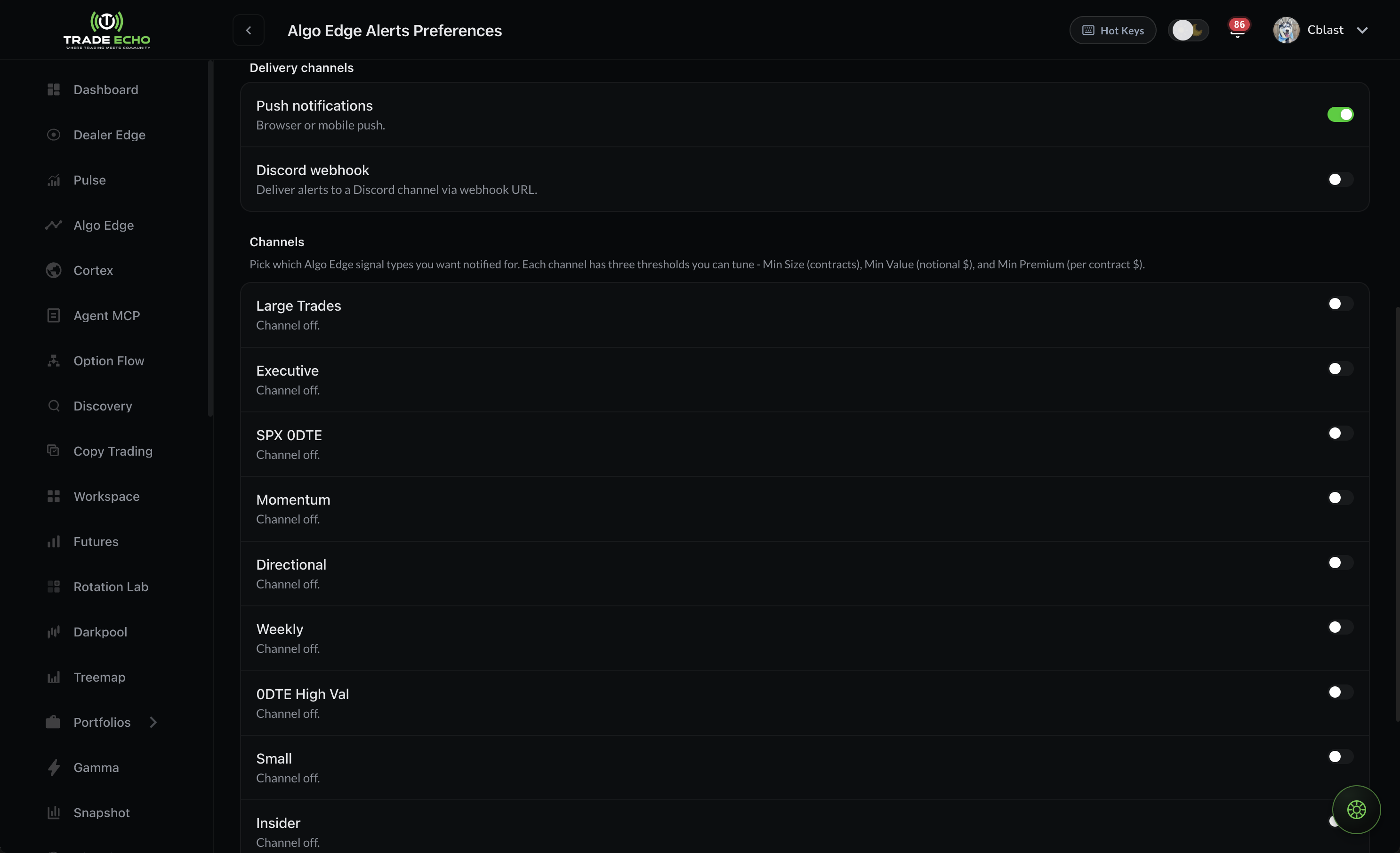 Algo Edge alerts preferences with channel cards
The shared controls#
These appear on the GEX, Algo Edge, and Option Flow preference pages:
Delivery channels#
- Push notifications - browser or mobile push
- Discord webhook - paste a webhook URL to route alerts into your own Discord server, with a test button to verify it
Cooldown#
Minimum minutes between repeat alerts for the same ticker (and tier/channel). Ranges from 5 minutes to a full day; default 60. Tighter cooldowns mean more alerts during volatile sessions.
Ticker source#
Which tickers can fire alerts:
| Source | Behavior |
|---|---|
| Watchlist | Only tickers on your Trade Echo watchlist - easiest to maintain |
| Custom list | Only tickers you list here, independent of your watchlist |
| All tickers | Every supported ticker - high signal volume; cooldown still applies |
Per-ticker overrides#
On top of your defaults, you can add overrides for individual tickers - e.g. tighter thresholds on SPY, looser on a mid-cap you're stalking.
Algo Edge alerts (9 channels)#
Each of the nine AlgoEdge channels gets its own collapsible card with an enable toggle and three thresholds:
- Min Size (contracts)
- Min Value ($)
- Min Premium per Contract ($)
Leave a field blank to use the channel's default (shown as the placeholder). The card summarizes your current thresholds when collapsed, so you can scan all nine at a glance.
Option Flow alerts (3 tiers)#
Option Flow alerts use three conviction tiers - Golden (highest priority), Aggressive, and Unusual. One notification is sent per option activity, using the highest tier that matches, so you never get triple-pinged for the same sweep.
Per tier you can tune:
- Min premium ($)
- Flow types - Sweep / Block / Trade
- Executions - at ask, above ask, at midpoint, at bid, below bid
- Volume > Open Interest toggle
- Max DTE (0 = no cap)
A "Default / Custom" pill on each tier card shows whether you've tuned it away from the stock thresholds.
GEX alerts#
Dealer-positioning alerts from Dealer Edge. You choose the tickers (your watchlist, a custom list, or all tickers) and turn each trigger on or off.
| Trigger | Default | Fires when |
|---|---|---|
| Anchor Approach | On | Price comes within your % of the GEX Anchor (default 0.5%). It fires once and re-arms only after price moves away, so lingering near the level does not spam you. |
| Charm Stack at Anchor | On | Price is near the Anchor and positive charm is building a few strikes above it. When this and Anchor Approach both match, only Charm Stack at Anchor fires. |
| Flip Cross | On | Price crosses the gamma Flip (positive to negative gamma or back). One alert per cross; it is a regime alert, not a proximity alert. |
| Clear Path to Anchor | Off (opt-in) | Price is above the Flip, the Anchor is within reach, no Defense Line sits in between, and little volume trades on the path. Fires once when that path forms. Turn it on in Dealer Edge alert settings. |
Each setup is explained in plain English in the Setups Library.
Chart / price-line alerts#
Create an alert straight from a drawn line (trendline, horizontal level) or from any price on the Pulse chart. Alerts are evaluated by a server-side scanner, so they fire even when the chart is closed. Manage, edit, or delete them from the alerts manager (bell icon) on Pulse - available on both web and mobile, and your alerts stay in sync across devices.
Social Feed and Member Alerts#
- Social Feed (https://app.tradeecho.com/social-feed-preferences) - control notifications for follows, comments, and post activity.
- Member Alerts - push notifications are per trader: follow a trader on the Member Alerts page and toggle push from the Following tab or the bell control on the Alerts feed. Link Discord once to sync with
!follow.
Mobile#
Push notifications arrive on iOS and Android once enabled - configure preferences on the web, receive them anywhere. Make sure notifications are allowed for the Trade Echo app in your phone's settings.
Recommended starting point#
- Ticker source: Watchlist
- Cooldown: 60 minutes
- Algo Edge: enable 2-3 channels that match your style (channel guide)
- Option Flow: Golden only to start; add Aggressive once you know the volume
- GEX: Anchor Approach + Flip Cross on your core index
Add more only when you find yourself wanting alerts you didn't get - not the other way around.