
Discord Server Guide
Your trading community hub. Navigate channels, enable alerts, use bot commands, and get the most from the Trade Echo Discord server.
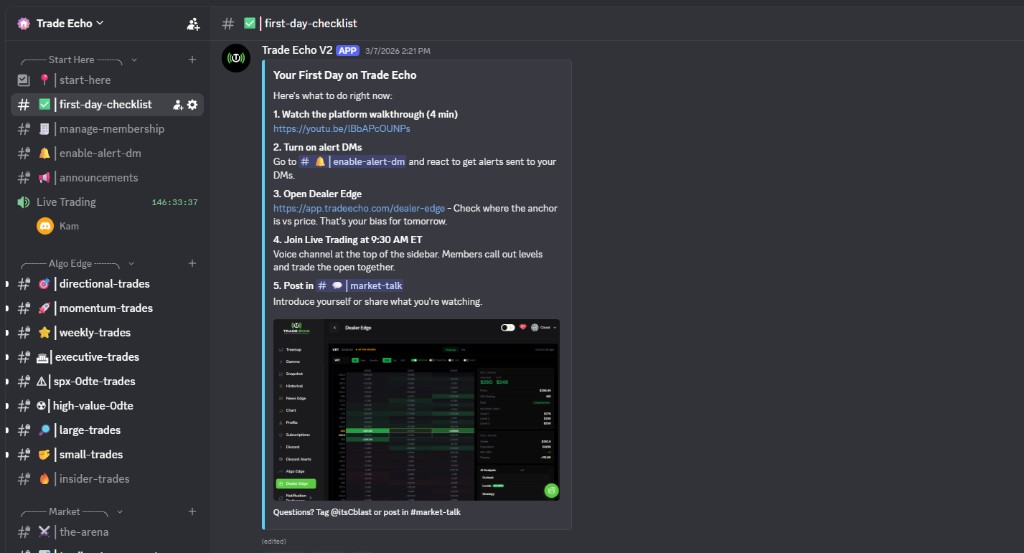 Trade Echo Discord with alert channels and first-day checklist
Algo Edge Trading Channels#
Real-time algorithmic trading signals and analysis. A channel for each setup style:
| Channel | Description | Best For |
|---|---|---|
| Momentum Trades | High-momentum setups for day trading | Quick scalps, momentum plays |
| SPX 0DTE Trades | Same-day expiration SPX options | Aggressive 0DTE trading (high risk) |
| Large Trades | Major movements (>1,000 contracts, >$1M value) | Following institutional flow |
| High Value 0DTE | High-impact same-day trades across major indices | Premium 0DTE opportunities |
| Weekly Trades | Short-term market bets expiring within a week | Swing trading |
| Directional Trades | Market sweeps across multiple exchanges | Directional bias confirmation |
| Executive Trades | SPY/QQQ index strategies | Index-based trading |
| Small Trades | Niche momentum opportunities | Stock picking, niche plays |
Pro Tip: Enable notifications for 2-3 channels that match your trading style. Avoid information overload.
Trading Hub Community#
Connect with other traders and share insights:
| Channel | Use For |
|---|---|
| Market News | Latest updates, earnings, Fed announcements |
| Share Success | Share winning trades and learn from others |
| Market Talk | General market discussion and analysis |
| Trade Analysis | In-depth analysis of specific trades |
| Watchlist | Stocks and assets to monitor |
Trade Alerts#
Stay informed with real-time opportunities:
| Channel | Access | Description |
|---|---|---|
| 2K Cblast | Premium members only | Premium 2K+ profit alerts |
| Cblast Alerts | All members | Standard trading alerts |
| VIP Alerts | VIP tier members | Exclusive VIP member alerts |
| 2K Forged by Steel | Steel strategy subscribers | High-value trades from Steel strategy |
| Member Alerts | Use !follow @trader | Community-generated alerts from followed traders |
Discord trade alerts are also parsed into structured trade cards in the dashboard - see the Member Alerts (In-App) hub with Top Traders and Following views.
Setting Up Your Alerts#
- Go to the enable-alert-dm channel
- Enable notifications for desired alert types
- Use
!follow @usernameto follow specific traders - Receive DMs when followed traders post alerts
Education Category#
Master advanced trading strategies:
| Channel | Learn |
|---|---|
| BT Cloud | Cloud-based trading strategies |
| Golden Zone | Fibonacci-based strategies |
| ORB | Range break trading methodology (Opening Range Breakout) |
| Strike to Pick | Options strike selection guide |
| SPX 0DTE | 0DTE trading methodology |
Bot Commands#
Track performance and manage trades:
| Command | Description | Example |
|---|---|---|
!trades [@user] | View trade history for yourself or another user | !trades or !trades @trader123 |
!open | See your currently open trades | !open |
!stats [@user] | View trading statistics and performance metrics | !stats or !stats @trader123 |
!leaderboard [duration] | Check the leaderboard (week/month/all time) | !leaderboard week |
!current [@user] | View current open positions for a user | !current @trader123 |
!follow @trader | Follow a trader to receive their Member Alerts | !follow @top_trader |
Using Commands Effectively#
- Use
!tradesregularly to track your performance - Check
!leaderboardto see where you rank - Use
!statsto analyze your trading patterns - Follow successful traders with
!follow
Notification Settings#
| Setting | How to Adjust |
|---|---|
| Server Notifications | Server settings - Notifications (default: @mentions and DMs) |
| Challenge Notifications | Go to enable-alert-dm channel and follow instructions |
| User DM Alerts | Use !follow @trader to get DMs when they post |
Recommended Setup#
- Enable notifications for your main Algo Edge channels
- Go to enable-alert-dm for challenge notifications
- Use
!followto follow top traders - Set Member Alerts to "Notify me"
- Enable Market News notifications
Quick Start Guide#
Your First 5 Steps#
- Explore channels - click through Algo Edge channels to see what interests you
- Enable notifications - right-click channel - "Notification Settings" - Enable notifications
- Try bot commands - type
!tradesto see your trade history - Post your first alert - after a trade, post in Member Alerts
- Engage in community - join discussion in Market Talk or Trade Analysis
Daily Routine#
- Morning (9:30 AM): Check Market News and Algo Edge channels
- During Trading: Post alerts as you trade
- After Trading: Share insights in Trade Analysis
- Evening: Check leaderboard with
!leaderboard - Weekly: Review your stats with
!stats
Best Practices#
Do:
- Post accurate alerts in real-time
- Share your reasoning and analysis
- Support and encourage other traders
- Engage positively in discussions
- Follow successful traders to learn
Don't:
- Post fake or misleading alerts
- Spam channels with low-quality content
- Be negative or discouraging to others
- Self-promote excessively